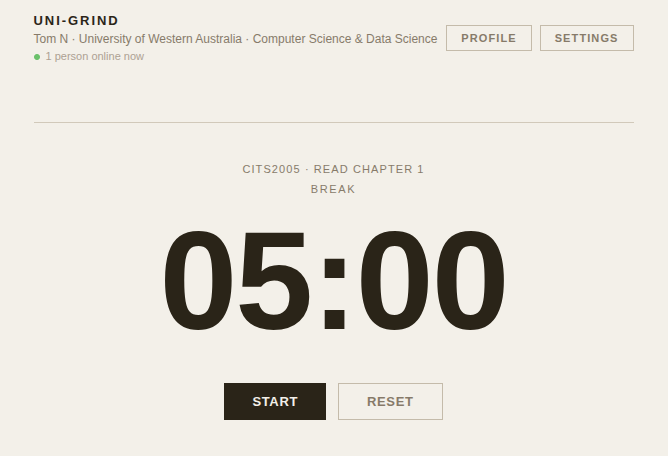
Over the past few weeks I have been building Uni-Grind, a study tracker designed for university students. What started as a personal frustration — not knowing how many hours I was actually studying or where that time was going — turned into a full-stack web application that is now live and being used by students at my university. This post is about what I built, the technical decisions I made along the way, and what I learned from shipping something real.
The Problem I Was Solving
Most study tools are either too simple or too complex. A plain timer tells you nothing. Apps like Notion or Todoist are powerful but not built around the core question: how much am I actually studying, and is it enough?
I wanted something that tracked Pomodoro sessions, broke down time by university unit, showed a daily streak, and put your hours on a leaderboard next to other students. Not to be competitive, but to stay accountable. The kind of visibility that makes you sit down and open your notes instead of convincing yourself you have done enough for the day.
What I Built It With
The stack I chose was deliberately practical and deployable:
- Next.js 15 (App Router) + React: For the frontend and routing, with server-side rendering where needed.
- Supabase: For authentication, a Postgres database, row-level security, and real-time presence.
- Recharts: For the weekly unit breakdown bar chart.
- Vercel: For deployment and edge functions.
- Resend: For transactional email on signup confirmation.
Lessons Learned
Building something used by real people surfaces problems that tutorials never mention. This project taught me:
- Browser timers drift. A naive setInterval approach caused the countdown to run seconds ahead over a few minutes. I fixed this by syncing against the wall clock on every tick and correcting on visibility change, so the timer stays accurate even after the tab is backgrounded or the laptop sleeps.
- Security has to be intentional. A friend stress-tested the app and found that without proper row-level security policies in Postgres, any authenticated user could query any other user's data. Fixing this meant thinking carefully about what each table should expose and to whom, including building a public_profiles view that deliberately omits sensitive columns.
- Ship early and fix what real users break. The most useful bugs I found came from people actually using the app, not from my own testing.
Conclusion
Uni-Grind is live at uni-grind.com. It is the most complete project I have shipped and the one I have learned the most from. Building it gave me confidence that I can take a problem, design a solution, and deliver something that works in production — which is ultimately what the industry is looking for. Every bug I fixed and every edge case I handled is a skill I did not have before I started.